
Look, I've been in this trade since 1996. I've stood in more city planning offices than I care to remember, argued with code enforcement officers who couldn't tell a channel letter from a light box, and watched perfect signs sit in warehouses for three months because some pencil-pusher wanted a "revised structural calculation." You're reading this because you or your customer is staring down a permitting process that feels like it was designed by someone who never installed a sign in their life.
So let's cut through the noise. I'm gonna tell you what permitting really costs, how long it actually takes, and exactly when you need that engineering stamp everyone's afraid of. No fluff, no sales pitch — just the stuff I've learned from 16 years on the factory floor and another decade before that crawling on roofs.
Here's what nobody tells you: a typical commercial sign permit in the US takes 4 to 12 weeks from application to approval. That's if you do everything right. Make a mistake — and you will — and you're looking at another 2 to 6 weeks per revision cycle. And those calendars don't account for the city planner's vacation in August or the fact that their computer system went down for three days.
I've seen this go wrong: a fast-food franchise wanted a 40-foot pylon sign in a mid-sized Texas town. The sign itself took 10 days to build at our factory. The permitting took 14 weeks. The engineer stamp cost $1,800. The city asked for a "wind load analysis based on ASCE 7-16" and then changed their mind about which exposure category to use. Twice.
My advice: assume 8 weeks minimum for any sign permit in a city with more than 50,000 people. Add 4 weeks if it's illuminated, 6 weeks if it's on a freestanding pole, and 8 weeks if you're trying to put anything within 50 feet of a historic district. Plan your production around that timeline, not the other way around.
The ugly truth is most cities will ask for a "registered professional engineer's stamp" on your sign's structural drawings. But the real question is: do you actually need one, or is the city just covering their liability?
Short answer: any sign that's over 100 square feet, over 6 feet tall, or mounted on a roof almost always requires a PE stamp. Wall-mounted channel letters under 3 feet? Usually not. Illuminated signs with internal structural framing? Maybe. The problem is consistency — one city might require a stamp for a 4-foot monument sign, while the next city over lets you submit a simple shop drawing.
I've seen this go wrong: a shop in Houston built 15 identical channel letter sets for a bank chain. Each city in the metro area had different requirements. One wanted a full structural calculation with wind loads. Another just wanted an electrician's signature. The third didn't even read the submittal — they checked the payment and issued the permit. No rhyme or reason.
Here's the trick: call the building department before you start designing. Ask for their "sign permit checklist" and specifically ask: "Do you require a structural engineer's seal for this size/type of sign?" Write down their exact answer and the name of who told you. If they say no, get it in an email. That email is your insurance against some random inspector changing his mind two months later.
On the factory side: at Aochuang, we give you all the engineering data you need — weight, wind load calculations, mounting details, material specs (304 stainless, 2mm acrylic face with 92% transmission, Samsung LEDs with 50,000 hour L70 rating). But that doesn't replace a PE stamp unless the city explicitly accepts "factory engineering" — and most won't. Budget $500 to $2,000 for a stamp depending on complexity. Don't cheap out on the engineer; I've seen $300 stamps rejected because the guy didn't have the right insurance.
Every city thinks their code is the most important. Here's what I see over and over again:
Here's the brutal part: even if your sign meets every requirement, inspectors have discretion. I've seen a permit denied because the letter font wasn't "aesthetically compatible" with the building. No joke. You can fight it, but it costs time and legal money.
Look, the best way to speed up a permit is to hand the city exactly what they want on the first try. That means getting your factory specs right from day one.
At Aochuang, every sign goes through a 10-step production process, but the paperwork starts before the first cut. We provide detailed CAD files with tolerances (±0.1mm), material certifications (CE, RoHS, ISO 9001), LED module data sheets showing lumen output and lifespan, and structural calculations for mounting. All that goes straight into your permit submittal.
Specific data that helps: our channel letters use 3mm acrylic (92% light transmittance, UV-resistant for 5-8 years) with SMD 2835 LEDs (100-150 lm/W). The stainless 304 body is 1.5mm thick, welded with TIG, and sealed with neutral silicone. That's the kind of detail that makes inspectors nod and move on — because it shows you're not guessing.
Another thing: if your sign is for a national account (Starbucks, McDonald's, Walgreens), they often have pre-approved vendor lists and engineering stamps already on file with major cities. Use that. If you're a small shop, partner with a factory that can supply pre-tested assemblies. It saves weeks.
I've watched sign shops make the same mistakes for 16 years. Let me save you the headache:
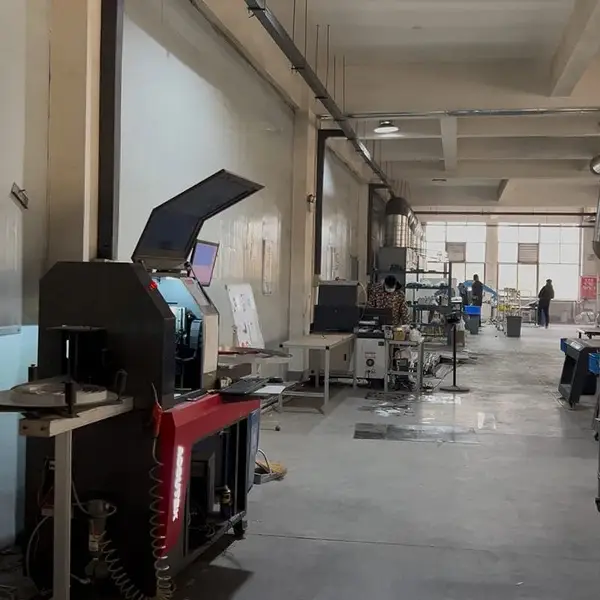
Real photo from our production floor — every sign we ship is made here.
Products mentioned or relevant to this topic — factory-direct, custom built.
From $24/letter · MOQ 1 piece · Flexible lead time · CE & UL certified · ships to 20+ countries
Custom sizes, colors, and finishes. Get a factory price in 24 hours.
Get a Free Quote Copy EmailWhatsApp +86 13865703472 · business@aochuangsign.cn
See pricing, specs, and get a free quote for the sign type you need. Built in our factory, shipped worldwide.