
You've seen it happen. A sign that's been running flawlessly for years suddenly develops a dark patch. Or worse — the whole thing flickers and dies on a Friday night, leaving your client's business dark all weekend. Emergency service calls cost you time, money, and reputation.
Here's the hard truth from the factory floor: Most manufacturers say replace modules every 3-5 years. But in my 15 years working with Aochuang Sign and dozens of other manufacturers across China, I've seen quality LED modules from Samsung or Osram chips run strong for 7-10 years. Meanwhile, cheap modules fail in 12-18 months. The difference isn't marketing hype — it's physics and component quality.
So how often should you actually replace them? The answer depends on three things: the module's quality tier, how many hours it runs daily, and the environment it lives in. Let's break it down with real numbers you can use.
LED modules are rated for L70 lifespan — that's the point when light output drops to 70% of original brightness. For quality modules using SMD 2835 chips (the industry standard), L70 is typically 50,000 hours. But that's a lab number. In the real world, heat, voltage fluctuations, and humidity eat into that.
Here's what I've seen across thousands of installations:
| Quality Tier | Chip Brand | Lab L70 Rating | Real-World Lifespan (12 hrs/day) | Real-World Lifespan (24 hrs/day) | Warranty |
|---|---|---|---|---|---|
| Budget | Generic Chinese | 20,000-30,000 hrs | 2-3 years | 1-1.5 years | Usually none |
| Mid-Range | Blue-ray (domestic) | 40,000-50,000 hrs | 4-6 years | 2-3 years | 2 years |
| Premium | Samsung, Osram, Lan Jing | 50,000-70,000 hrs | 7-10 years | 3-5 years | 5 years |
The key takeaway: A module running 12 hours a night will last roughly twice as long as one running 24/7. And that premium module? It's not just about lifespan — it maintains consistent color temperature and brightness far longer. Cheap modules shift color within 6 months. You'll see it as a yellow or blue tint compared to new modules.
Heat is the #1 killer of LED modules. Every 10°C above 25°C ambient temperature cuts LED lifespan by roughly half. That's not an exaggeration — it's basic semiconductor physics. A sign mounted on a south-facing brick wall in Phoenix will cook modules 2-3x faster than the same sign in Seattle.
Here's what accelerates degradation:
The thing is, you can't control the weather. But you can control the module quality and installation. If your client's sign faces direct afternoon sun in a humid coastal city, plan for replacement at 60-70% of the normal lifespan. That's not pessimism — it's good business.
Stop guessing. Here's a formula you can use right now:
Estimated years to replacement = (L70 rating in hours) ÷ (daily run hours × 365) × 0.7
The 0.7 multiplier accounts for real-world factors: heat, voltage variation, and manufacturing tolerance. It's conservative but honest.
Let's run two examples:
Now, here's the factory-floor wisdom: The formula assumes stable voltage and moderate temperatures (below 35°C). If your sign is in a hot climate or has known power issues, reduce the multiplier to 0.5. That gives you a realistic worst-case schedule.
You don't need a spectrometer to catch failing modules. Your eyes and a smartphone camera are enough. Here's what I teach my QC team at Aochuang Sign:
Set a quarterly inspection schedule for every sign you maintain. Take photos. Keep a log. That's how you catch problems before they become emergencies.
This is where most sign shops get it wrong. They replace one module at a time, creating a patchwork of brightness and color. It looks unprofessional, and customers notice.
Here's the rule of thumb: If more than 20% of the modules in a sign are failing or have shifted color, replace all of them at once. The labor cost to swap individual modules is the same whether you replace one or twenty. And the material cost for a single module is small compared to the truck roll.
Let's run the numbers using factory-direct pricing from Aochuang Sign:
| Scenario | Module Cost | Labor (per module) | Total per Sign | Downtime | Customer Satisfaction |
|---|---|---|---|---|---|
| Replace 2 failing modules (patch) | $40-80 (front-lit letters) | $100-200 | $280-560 | 2-3 hrs | Low (visible mismatch) |
| Replace all 20 modules (full) | $400-800 | $200-400 | $600-1,200 | 4-6 hrs | High (uniform look) |
| Replace entire sign (new) | $2,000-4,000 | $500-1,000 | $2,500-5,000 | 1-2 days | Highest (brand new) |
The math is clear: For a sign with 20 modules, a full module replacement costs about 20-30% of a new sign. And you get 5-7 more years of life. That's a no-brainer for most commercial clients.
But here's the exception: If the sign itself is physically damaged (corroded stainless steel, cracked acrylic, failing power supply), replace the whole thing. A new sign with premium modules from a factory like ours — with 2-year LED warranty, 1-year power supply warranty — costs $200-700 per letter installed for front-lit. That's competitive when you factor in the peace of mind.
The #1 complaint I hear from sign shops: "I ordered the same model, but the new modules look different." Here's why — and how to avoid it.
LED manufacturers bin their chips by color temperature and brightness. Even within the same "6000K" spec, there can be a 500K variation between batches. That's the difference between "crisp white" and "blue-ish white." To match perfectly:
Pro tip: If you're replacing modules in a sign that's more than 5 years old, just replace all of them. The color shift on the old ones will be noticeable even with a perfect bin match. Trust me on this — I've seen too many patchwork signs that look terrible.
The most cost-effective strategy isn't reactive — it's proactive. Here's what I recommend to every sign shop owner I work with:
At Aochuang Sign, we see clients who buy cheap modules save $50-100 upfront, then spend $400-800 on emergency replacements within 2 years. The smart ones buy premium from day one. They pay 20-30% more for the modules but save 50-60% over 10 years in total cost of ownership.
Q1: How many years do LED sign modules typically last before needing replacement?
A: It depends on the quality tier and daily run hours. Budget modules (generic chips) last 2-3 years at 12 hrs/day, or 1-1.5 years at 24/7. Mid-range modules (domestic brands) last 4-6 years. Premium modules (Samsung, Osram, Lan Jing) last 7-10 years at 12 hrs/day, or 3-5 years at 24/7. Always use the formula: (L70 hours ÷ daily run hours × 365) × 0.7 to estimate your specific situation.
Q2: What are the first signs that an LED module is failing?
A: Look for three things: color shift (yellowing or bluing compared to new modules), dimming (20%+ drop detectable by phone camera), and dead pixels (3+ dead LEDs in a module). Flickering on video and audible buzzing are also early warning signs. Catch these early, and you can plan a proactive replacement instead of an emergency call.
Q3: Can I replace just one module, or do I need to replace the whole panel?
A: If less than 20% of modules are failing and the sign is under 5 years old, you can replace individual modules — but only if you can match the color and brightness perfectly. For signs older than 5 years, or where more than 20% are failing, replace all modules at once. The labor cost is nearly the same, and you'll get a uniform look that keeps your client happy.
Q4: Does running the sign 24/7 vs. only at night affect replacement frequency?
A: Absolutely. A module running 24/7 accumulates roughly twice the hours per year as one running 12 hrs/day. That means replacement at half the calendar time. For 24/7 signs, always spec premium modules (Samsung/Osram) and plan for replacement at year 3-5 instead of year 7-10. The cost difference is worth it.
Q5: How do I match a replacement module to my existing sign without causing color mismatch?
A: Order from the same manufacturer using the same bin code. When you buy the original sign, request spares (5-10% extra) and store them in a cool, dry place. If you're ordering years later, provide the bin code from the original modules. Always test new modules side-by-side with old ones before installing. And if the sign is over 5 years old, just replace all modules — the color shift on the old ones will make matching impossible.
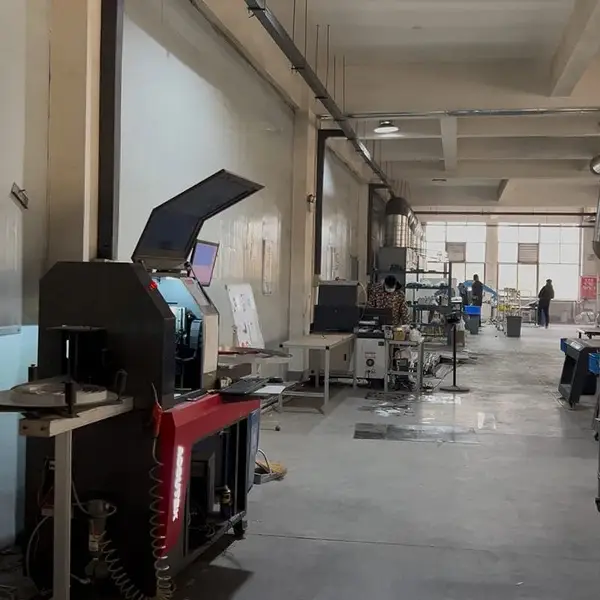
Real photo from our production floor — every sign we ship is made here.
Products mentioned or relevant to this topic — factory-direct, custom built.
From $24/letter · MOQ 1 piece · Flexible lead time · CE & UL certified · ships to 20+ countries
Custom sizes, colors, and finishes. Get a factory price in 24 hours.
Get a Free Quote Copy EmailWhatsApp +86 13865703472 · business@aochuangsign.cn
See pricing, specs, and get a free quote for the sign type you need. Built in our factory, shipped worldwide.